
Activity 1.1.1.
Run this code to see the output below it. Then change the code to print your name, for example “Hi Pat!”, and run again.
https://www.youtube.com/watch?v=Jn9_HaX3m7spublic class MyClass
{
public static void main(String[] args)
{
// Put your code here!
}
}
{ must have a matched close curly brace }. These are used to start and end class definitions and method definitions.main method in the following class. Then, change the code to print your name. Be sure to keep the starting and ending quotes ". Click on the run button to run the modified code.public, class, and void must be in lowercase, but class names such as System and String are capitalized.main method. There are extra blocks that you don’t need.main method. There are extra blocks that you don’t need.main method. There are extra blocks that you don’t need.;). Such a line is called a statement. You can think of the semicolon (;) in Java like a period (.) in English. The same way you use a period to end a sentence in English, you use a semicolon to end a statement in Java. You will not be penalized on the exam if you forget a needed semicolon, but the Java compiler is not so lenient; your program won’t compile without it. Note also that not every line ends with a semicolon; if the line starts a construct like an if statement, there is no semicolon before the opening { nor one after the closing }.; missing or if the code has a open curly brace { or open quote ", but no close curly brace } or close quote ". Informally, a syntax error is called a bug, and the process of removing errors is called debugging. An early computer science pioneer Grace Hopperhttps://en.wikipedia.org/wiki/Grace_Hopper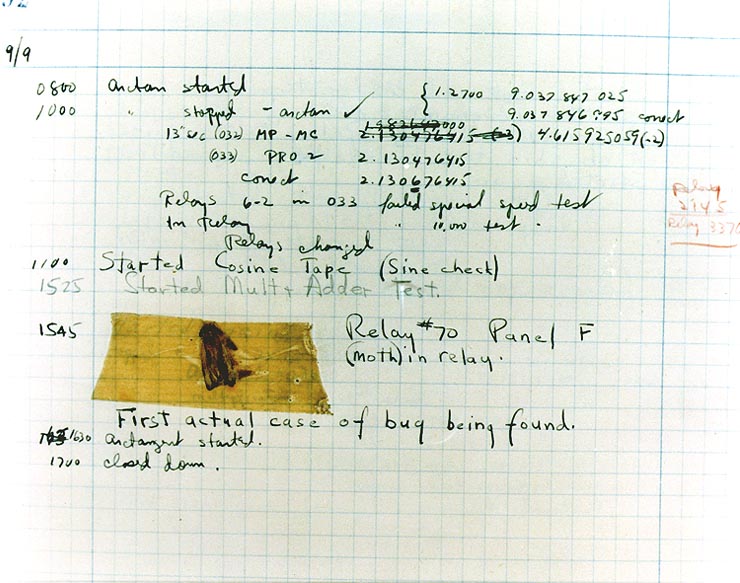
https://rubberduckdebugging.com/FirstClass.java:5: error: unclosed string literal
System.out.println("Hi there!);
^
1 error
:) followed by a number. That number tells you the line number in the file where the compiler detected the error, in this case line 5.^) positioned to point at exactly where in the line the Java compiler thinks the problem is. In this case it’s pointing at the quotation mark (”) before “Hi”. So it’s complaining about something being unclosed and it’s pointing us at a quotation mark. Usually quotation marks come in pairs called the open quote and the close quote, right? And if you look at the line of code you’ll see that there’s no closing quotation mark. Could that be the problem? Try adding a quotation mark and see if that fixes it!System is capitalized in System.out.println? Did you find the missing semicolon?// is used to mark the beginning of a comment. For multi-line comments, use /* to start the comment and */ to end the comment. The compiler will skip over comments. However, it is a good idea to use comments to make notes to yourself and other programmers working with you. Here are some examples of good commenting:/* MyClass.java
Programmer: My Name
Date:
*/
int max = 10; // this keeps track of the max score
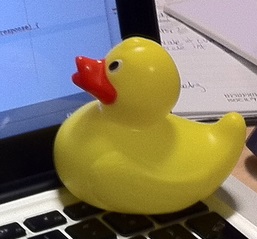
https://rubberduckdebugging.com/public class MyClass
{
public static void main(String[] args)
{
System.out.println("Hi there!");
}
}
; (semicolon). { } are used to enclose blocks of code. // and /* */ are used for comments.; at end of lines containing complete statements and matching { }, (), and "".System.out.println("Roses are red, ") // Line 1;
System.out.println("Violets are blue, ") // Line 2;
System.out.println("Unexpected '}' on line 32. ") // Line 3;
Roses are red,
Violets are blue,
Unexpected '}' on line 32.
Data: turtleClasses.jarimport java.awt.Image;
import java.awt.image.BufferedImage;
/**
* Interface to describe a digital picture. A digital picture can have an
* associated file name. It can have a title. It has pixels
* associated with it and you can get and set the pixels. You
* can get an Image from a picture or a BufferedImage. You can load
* it from a file name or image. You can show a picture. You can
* explore a picture. You can create a new image for it.
*
* @author Barb Ericson ericson@cc.gatech.edu
*/
public interface DigitalPicture
{
public String getFileName(); // get the file name that the picture came from
public String getTitle(); // get the title of the picture
public void setTitle(String title); // set the title of the picture
public int getWidth(); // get the width of the picture in pixels
public int getHeight(); // get the height of the picture in pixels
public Image getImage(); // get the image from the picture
public BufferedImage getBufferedImage(); // get the buffered image
public int getBasicPixel(int x, int y); // get the pixel information as an int
public void setBasicPixel(int x, int y, int rgb); // set the pixel information
public Pixel getPixel(int x, int y); // get the pixel information as an object
public Pixel[] getPixels(); // get all pixels in row-major order
public Pixel[][] getPixels2D(); // get 2-D array of pixels in row-major order
public void load(Image image); // load the image into the picture
public boolean load(String fileName); // load the picture from a file
public void show(); // show the picture
public boolean write(String fileName); // write out a file
}
import java.awt.Graphics;
/**
* Interface to used to communicate between a model
* and its display
*
* Copyright Georgia Institute of Technology 2004
* @author Barb Ericson ericson@cc.gatech.edu
*/
public interface ModelDisplay
{
/** method to notify the thing that displays that
* the model has changed */
public void modelChanged();
/** method to add the model to the world
* @param model the model object to add */
public void addModel(Object model);
/**
* Method to remove the model from the world
* @param model the model object to remove */
public void remove(Object model);
/**
* Method that returns the graphics context
* for this model display
* @return the graphics context
*/
public Graphics getGraphics();
/**
* Method to clear the background
*/
public void clearBackground();
/** Method to get the width of the display
* @return the width in pixels of the display
*/
public int getWidth();
/** Method to get the height of the display
* @return the height in pixels of the display
*/
public int getHeight();
}
import java.awt.*;
import java.awt.geom.*;
/**
* This class represents a displayable path segment
* it has a color, width, and a Line2D object
* Copyright Georgia Institute of Technology 2005
* @author Barb Ericson ericson@cc.gatech.edu
*/
@SuppressWarnings("unchecked")
public class PathSegment
{
//////////////// fields /////////////////////
private Color color;
private int width;
private Line2D.Float line;
//////////////// constructors ///////////////
/**
* Constructor that takes the color, width,
* and line
*/
public PathSegment (Color theColor, int theWidth,
Line2D.Float theLine)
{
this.color = theColor;
this.width = theWidth;
this.line = theLine;
}
//////////////// methods ////////////////////
/**
* Method to paint this path segment
* @param g the graphics context
*/
public void paintComponent(Graphics g)
{
Graphics2D g2 = (Graphics2D) g;
BasicStroke penStroke = new BasicStroke(this.width);
g2.setStroke(penStroke);
g2.setColor(this.color);
g2.draw(this.line);
}
} // end of class
import java.awt.*;
import java.awt.geom.*;
import javax.swing.*;
import java.util.List;
import java.util.ArrayList;
import java.util.Iterator;
/**
* Class to represent a pen which has a color, width,
* and a list of path segments that it should draw.
* A pen also knows if it is up or down
*
* Copyright Georgia Institute of Technology 2004
* @author Barb Ericson ericson@cc.gatech.edu
*/
@SuppressWarnings("unchecked")
public class Pen
{
////////////////// fields //////////////////////
/** track if up or down */
private boolean penDown = true;
/** color of ink */
private Color color = Color.green;
/** width of stroke */
private int width = 1;
/** list of path segment objects to draw */
private List<PathSegment> pathSegmentList =
new ArrayList<PathSegment>();
//////////////// constructors ///////////////////
/**
* Constructor that takes no arguments
*/
public Pen() { }
/**
* Constructor that takes all the ink color, and width
* @param color the ink color
* @param width the width in pixels
*/
public Pen(Color color, int width)
{
this.color = color;
this.width = width;
}
/**
* Constructor that takes the ink color, width, and penDown flag
* @param color the ink color
* @param width the width in pixels
* @param penDown the flag if the pen is down
*/
public Pen(Color color, int width, boolean penDown)
{
// use the other constructor to set these
this(color,width);
// set the pen down flag
this.penDown = penDown;
}
////////////////// methods ///////////////////////
/**
* Method to get pen down status
* @return true if the pen is down else false
*/
public boolean isPenDown() { return penDown; }
/**
* Method to set the pen down value
* @param value the new value to use
*/
public void setPenDown(boolean value) { penDown = value; }
/**
* Method to get the pen (ink) color
* @return the ink color
*/
public Color getColor() { return color; }
/**
* Method to set the pen (ink) color
* @param color the color to use
*/
public void setColor(Color color) { this.color = color;}
/**
* Method to get the width of the pen
* @return the width in pixels
*/
public int getWidth() { return width; }
/**
* Method to set the width of the pen
* @param width the width to use in pixels
*/
public void setWidth(int width) { this.width = width; }
/**
* Method to add a path segment if the pen is down
* @param x1 the first x
* @param y1 the first y
* @param x2 the second x
* @param y2 the second y
*/
public synchronized void addMove(int x1, int y1, int x2, int y2)
{
if (penDown)
{
PathSegment pathSeg =
new PathSegment(this.color,this.width,
new Line2D.Float(x1,y1,x2,y2));
pathSegmentList.add(pathSeg);
}
}
/**
* Method to clear the path stored for this pen
*/
public void clearPath()
{
pathSegmentList.clear();
}
/**
* Metod to paint the pen path
* @param g the graphics context
*/
public synchronized void paintComponent(Graphics g)
{
Color oldcolor = g.getColor();
// loop through path segment list and
Iterator iterator = pathSegmentList.iterator();
PathSegment pathSeg = null;
// loop through path segments
while (iterator.hasNext())
{
pathSeg = (PathSegment) iterator.next();
pathSeg.paintComponent(g);
}
g.setColor(oldcolor);
}
} // end of class
import java.awt.*;
import java.awt.font.*;
import java.awt.geom.*;
import java.awt.image.BufferedImage;
import java.text.*;
import java.util.*;
import java.util.List; // resolves problem with java.awt.List and java.util.List
/**
* A class that represents a picture. This class inherits from
* SimplePicture and allows the student to add functionality to
* the Picture class.
*
* @author Barbara Ericson ericson@cc.gatech.edu
*/
@SuppressWarnings("unchecked")
public class Picture extends SimplePicture
{
///////////////////// constructors //////////////////////////////////
/**
* Constructor that takes no arguments
*/
public Picture ()
{
/* not needed but use it to show students the implicit call to super()
* child constructors always call a parent constructor
*/
super();
}
/**
* Constructor that takes a file name and creates the picture
* @param fileName the name of the file to create the picture from
*/
public Picture(String fileName)
{
// let the parent class handle this fileName
super(fileName);
}
/**
* Constructor that takes the height and width
* @param height the height of the desired picture
* @param width the width of the desired picture
*/
public Picture(int width, int height)
{
// let the parent class handle this width and height
super(width,height);
}
/**
* Constructor that takes a picture and creates a
* copy of that picture
* @param copyPicture the picture to copy
*/
public Picture(Picture copyPicture)
{
// let the parent class do the copy
super(copyPicture);
}
/**
* Constructor that takes a buffered image
* @param image the buffered image to use
*/
public Picture(BufferedImage image)
{
super(image);
}
////////////////////// methods ///////////////////////////////////////
/**
* Method to return a string with information about this picture.
* @return a string with information about the picture such as fileName,
* height and width.
*/
public String toString()
{
String output = "Picture, filename " + getFileName() +
" height " + getHeight()
+ " width " + getWidth();
return output;
}
} // this } is the end of class Picture, put all new methods before this
import java.awt.Color;
/**
* Class that references a pixel in a picture. Pixel
* stands for picture element where picture is
* abbreviated pix. A pixel has a column (x) and
* row (y) location in a picture. A pixel knows how
* to get and set the red, green, blue, and alpha
* values in the picture. A pixel also knows how to get
* and set the color using a Color object.
*
* @author Barb Ericson ericson@cc.gatech.edu
*/
@SuppressWarnings("unchecked")
public class Pixel
{
////////////////////////// fields ///////////////////////////////////
/** the digital picture this pixel belongs to */
private DigitalPicture picture;
/** the x (column) location of this pixel in the picture; (0,0) is top left */
private int x;
/** the y (row) location of this pixel in the picture; (0,0) is top left */
private int y;
////////////////////// constructors /////////////////////////////////
/**
* A constructor that takes the x and y location for the pixel and
* the picture the pixel is coming from
* @param picture the picture that the pixel is in
* @param x the x location of the pixel in the picture
* @param y the y location of the pixel in the picture
*/
public Pixel(DigitalPicture picture, int x, int y)
{
// set the picture
this.picture = picture;
// set the x location
this.x = x;
// set the y location
this.y = y;
}
///////////////////////// methods //////////////////////////////
/**
* Method to get the x location of this pixel.
* @return the x location of the pixel in the picture
*/
public int getX() { return x; }
/**
* Method to get the y location of this pixel.
* @return the y location of the pixel in the picture
*/
public int getY() { return y; }
/**
* Method to get the row (y value)
* @return the row (y value) of the pixel in the picture
*/
public int getRow() { return y; }
/**
* Method to get the column (x value)
* @return the column (x value) of the pixel
*/
public int getCol() { return x; }
/**
* Method to get the amount of alpha (transparency) at this pixel.
* It will be from 0-255.
* @return the amount of alpha (transparency)
*/
public int getAlpha() {
/* get the value at the location from the picture as a 32 bit int
* with alpha, red, green, blue each taking 8 bits from left to right
*/
int value = picture.getBasicPixel(x,y);
// get the alpha value (starts at 25 so shift right 24)
// then and it with all 1's for the first 8 bits to keep
// end up with from 0 to 255
int alpha = (value >> 24) & 0xff;
return alpha;
}
/**
* Method to get the amount of red at this pixel. It will be
* from 0-255 with 0 being no red and 255 being as much red as
* you can have.
* @return the amount of red from 0 for none to 255 for max
*/
public int getRed() {
/* get the value at the location from the picture as a 32 bit int
* with alpha, red, green, blue each taking 8 bits from left to right
*/
int value = picture.getBasicPixel(x,y);
// get the red value (starts at 17 so shift right 16)
// then AND it with all 1's for the first 8 bits to
// end up with a resulting value from 0 to 255
int red = (value >> 16) & 0xff;
return red;
}
/**
* Method to get the red value from a pixel represented as an int
* @param value the color value as an int
* @return the amount of red
*/
public static int getRed(int value)
{
int red = (value >> 16) & 0xff;
return red;
}
/**
* Method to get the amount of green at this pixel. It will be
* from 0-255 with 0 being no green and 255 being as much green as
* you can have.
* @return the amount of green from 0 for none to 255 for max
*/
public int getGreen() {
/* get the value at the location from the picture as a 32 bit int
* with alpha, red, green, blue each taking 8 bits from left to right
*/
int value = picture.getBasicPixel(x,y);
// get the green value (starts at 9 so shift right 8)
int green = (value >> 8) & 0xff;
return green;
}
/**
* Method to get the green value from a pixel represented as an int
* @param value the color value as an int
* @return the amount of green
*/
public static int getGreen(int value)
{
int green = (value >> 8) & 0xff;
return green;
}
/**
* Method to get the amount of blue at this pixel. It will be
* from 0-255 with 0 being no blue and 255 being as much blue as
* you can have.
* @return the amount of blue from 0 for none to 255 for max
*/
public int getBlue() {
/* get the value at the location from the picture as a 32 bit int
* with alpha, red, green, blue each taking 8 bits from left to right
*/
int value = picture.getBasicPixel(x,y);
// get the blue value (starts at 0 so no shift required)
int blue = value & 0xff;
return blue;
}
/**
* Method to get the blue value from a pixel represented as an int
* @param value the color value as an int
* @return the amount of blue
*/
public static int getBlue(int value)
{
int blue = value & 0xff;
return blue;
}
/**
* Method to get a color object that represents the color at this pixel.
* @return a color object that represents the pixel color
*/
public Color getColor()
{
/* get the value at the location from the picture as a 32 bit int
* with alpha, red, green, blue each taking 8 bits from left to right
*/
int value = picture.getBasicPixel(x,y);
// get the red value (starts at 17 so shift right 16)
// then AND it with all 1's for the first 8 bits to
// end up with a resulting value from 0 to 255
int red = (value >> 16) & 0xff;
// get the green value (starts at 9 so shift right 8)
int green = (value >> 8) & 0xff;
// get the blue value (starts at 0 so no shift required)
int blue = value & 0xff;
return new Color(red,green,blue);
}
/**
* Method to set the pixel color to the passed in color object.
* @param newColor the new color to use
*/
public void setColor(Color newColor)
{
// set the red, green, and blue values
int red = newColor.getRed();
int green = newColor.getGreen();
int blue = newColor.getBlue();
// update the associated picture
updatePicture(this.getAlpha(),red,green,blue);
}
/**
* Method to update the picture based on the passed color
* values for this pixel
* @param alpha the alpha (transparency) at this pixel
* @param red the red value for the color at this pixel
* @param green the green value for the color at this pixel
* @param blue the blue value for the color at this pixel
*/
public void updatePicture(int alpha, int red, int green, int blue)
{
// create a 32 bit int with alpha, red, green blue from left to right
int value = (alpha << 24) + (red << 16) + (green << 8) + blue;
// update the picture with the int value
picture.setBasicPixel(x,y,value);
}
/**
* Method to correct a color value to be within 0 to 255
* @param the value to use
* @return a value within 0 to 255
*/
private static int correctValue(int value)
{
if (value < 0)
value = 0;
if (value > 255)
value = 255;
return value;
}
/**
* Method to set the red to a new red value
* @param value the new value to use
*/
public void setRed(int value)
{
// set the red value to the corrected value
int red = correctValue(value);
// update the pixel value in the picture
updatePicture(getAlpha(), red, getGreen(), getBlue());
}
/**
* Method to set the green to a new green value
* @param value the value to use
*/
public void setGreen(int value)
{
// set the green value to the corrected value
int green = correctValue(value);
// update the pixel value in the picture
updatePicture(getAlpha(), getRed(), green, getBlue());
}
/**
* Method to set the blue to a new blue value
* @param value the new value to use
*/
public void setBlue(int value)
{
// set the blue value to the corrected value
int blue = correctValue(value);
// update the pixel value in the picture
updatePicture(getAlpha(), getRed(), getGreen(), blue);
}
/**
* Method to set the alpha (transparency) to a new alpha value
* @param value the new value to use
*/
public void setAlpha(int value)
{
// make sure that the alpha is from 0 to 255
int alpha = correctValue(value);
// update the associated picture
updatePicture(alpha, getRed(), getGreen(), getBlue());
}
/**
* Method to get the distance between this pixel's color and the passed color
* @param testColor the color to compare to
* @return the distance between this pixel's color and the passed color
*/
public double colorDistance(Color testColor)
{
double redDistance = this.getRed() - testColor.getRed();
double greenDistance = this.getGreen() - testColor.getGreen();
double blueDistance = this.getBlue() - testColor.getBlue();
double distance = Math.sqrt(redDistance * redDistance +
greenDistance * greenDistance +
blueDistance * blueDistance);
return distance;
}
/**
* Method to compute the color distances between two color objects
* @param color1 a color object
* @param color2 a color object
* @return the distance between the two colors
*/
public static double colorDistance(Color color1,Color color2)
{
double redDistance = color1.getRed() - color2.getRed();
double greenDistance = color1.getGreen() - color2.getGreen();
double blueDistance = color1.getBlue() - color2.getBlue();
double distance = Math.sqrt(redDistance * redDistance +
greenDistance * greenDistance +
blueDistance * blueDistance);
return distance;
}
/**
* Method to get the average of the colors of this pixel
* @return the average of the red, green, and blue values
*/
public double getAverage()
{
double average = (getRed() + getGreen() + getBlue()) / 3.0;
return average;
}
/**
* Method to return a string with information about this pixel
* @return a string with information about this pixel
*/
public String toString()
{
return "Pixel row=" + getRow() +
" col=" + getCol() +
" red=" + getRed() +
" green=" + getGreen() +
" blue=" + getBlue();
}
}
import javax.imageio.ImageIO;
import java.awt.image.BufferedImage;
import javax.swing.ImageIcon;
import java.awt.*;
import java.io.*;
import java.awt.geom.*;
import java.io.ByteArrayOutputStream;
// import javax.xml.bind.DatatypeConverter;
// Using java.util.Base64 instead of javax.xml.bind
import java.util.Base64;
import java.util.Scanner;
/**
* A class that represents a simple picture. A simple picture may have
* an associated file name and a title. A simple picture has pixels,
* width, and height. A simple picture uses a BufferedImage to
* hold the pixels. You can also explore a simple picture.
*
* @author Barb Ericson ericson@cc.gatech.edu
*/
@SuppressWarnings("unchecked")
public class SimplePicture implements DigitalPicture
{
/////////////////////// Fields /////////////////////////
/**
* the file name associated with the simple picture
*/
private String fileName;
/**
* the path name for the file
*/
private String pathName;
/**
* the title of the simple picture
*/
private String title;
/**
* buffered image to hold pixels for the simple picture
*/
private BufferedImage bufferedImage;
/**
* extension for this file (jpg or bmp)
*/
private String extension;
/////////////////////// Constructors /////////////////////////
/**
* A Constructor that takes no arguments. It creates a picture with
* a width of 200 and a height of 100 that is all white.
* A no-argument constructor must be given in order for a class to
* be able to be subclassed. By default all subclasses will implicitly
* call this in their parent's no-argument constructor unless a
* different call to super() is explicitly made as the first line
* of code in a constructor.
*/
public SimplePicture()
{this(200,100);}
/**
* A Constructor that takes a file name and uses the file to create
* a picture
* @param fileName the file name to use in creating the picture
*/
public SimplePicture(String fileName)
{
// load the picture into the buffered image
load(fileName);
}
/**
* A constructor that takes the width and height desired for a picture and
* creates a buffered image of that size. This constructor doesn't
* show the picture. The pixels will all be white.
* @param width the desired width
* @param height the desired height
*/
public SimplePicture(int width, int height)
{
bufferedImage = new BufferedImage(width, height, BufferedImage.TYPE_INT_RGB);
title = "None";
fileName = "None";
extension = "jpg";
setAllPixelsToAColor(Color.white);
}
/**
* A constructor that takes the width and height desired for a picture and
* creates a buffered image of that size. It also takes the
* color to use for the background of the picture.
* @param width the desired width
* @param height the desired height
* @param theColor the background color for the picture
*/
public SimplePicture(int width, int height, Color theColor)
{
this(width,height);
setAllPixelsToAColor(theColor);
}
/**
* A Constructor that takes a picture to copy information from
* @param copyPicture the picture to copy from
*/
public SimplePicture(SimplePicture copyPicture)
{
if (copyPicture.fileName != null)
{
this.fileName = new String(copyPicture.fileName);
this.extension = copyPicture.extension;
}
if (copyPicture.title != null)
this.title = new String(copyPicture.title);
if (copyPicture.bufferedImage != null)
{
this.bufferedImage = new BufferedImage(copyPicture.getWidth(),
copyPicture.getHeight(), BufferedImage.TYPE_INT_RGB);
this.copyPicture(copyPicture);
}
}
/**
* A constructor that takes a buffered image
* @param image the buffered image
*/
public SimplePicture(BufferedImage image)
{
this.bufferedImage = image;
title = "None";
fileName = "None";
extension = "jpg";
}
////////////////////////// Methods //////////////////////////////////
/**
* Method to get the extension for this picture
* @return the extension (jpg, bmp, giff, etc)
*/
public String getExtension() { return extension; }
/**
* Method that will copy all of the passed source picture into
* the current picture object
* @param sourcePicture the picture object to copy
*/
public void copyPicture(SimplePicture sourcePicture)
{
Pixel sourcePixel = null;
Pixel targetPixel = null;
// loop through the columns
for (int sourceX = 0, targetX = 0;
sourceX < sourcePicture.getWidth() &&
targetX < this.getWidth();
sourceX++, targetX++)
{
// loop through the rows
for (int sourceY = 0, targetY = 0;
sourceY < sourcePicture.getHeight() &&
targetY < this.getHeight();
sourceY++, targetY++)
{
sourcePixel = sourcePicture.getPixel(sourceX,sourceY);
targetPixel = this.getPixel(targetX,targetY);
targetPixel.setColor(sourcePixel.getColor());
}
}
}
/**
* Method to set the color in the picture to the passed color
* @param color the color to set to
*/
public void setAllPixelsToAColor(Color color)
{
// loop through all x
for (int x = 0; x < this.getWidth(); x++)
{
// loop through all y
for (int y = 0; y < this.getHeight(); y++)
{
getPixel(x,y).setColor(color);
}
}
}
/**
* Method to get the buffered image
* @return the buffered image
*/
public BufferedImage getBufferedImage()
{
return bufferedImage;
}
/**
* Method to get a graphics object for this picture to use to draw on
* @return a graphics object to use for drawing
*/
public Graphics getGraphics()
{
return bufferedImage.getGraphics();
}
/**
* Method to get a Graphics2D object for this picture which can
* be used to do 2D drawing on the picture
*/
public Graphics2D createGraphics()
{
return bufferedImage.createGraphics();
}
/**
* Method to get the file name associated with the picture
* @return the file name associated with the picture
*/
public String getFileName() { return fileName; }
/**
* Method to set the file name
* @param name the full pathname of the file
*/
public void setFileName(String name)
{
fileName = name;
}
/**
* Method to get the title of the picture
* @return the title of the picture
*/
public String getTitle()
{ return title; }
/**
* Method to set the title for the picture
* @param title the title to use for the picture
*/
public void setTitle(String title)
{
this.title = title;
}
/**
* Method to get the width of the picture in pixels
* @return the width of the picture in pixels
*/
public int getWidth() { return bufferedImage.getWidth(); }
/**
* Method to get the height of the picture in pixels
* @return the height of the picture in pixels
*/
public int getHeight() { return bufferedImage.getHeight(); }
/**
* Method to get an image from the picture
* @return the buffered image since it is an image
*/
public Image getImage()
{
return bufferedImage;
}
/**
* Method to return the pixel value as an int for the given x and y location
* @param x the x coordinate of the pixel
* @param y the y coordinate of the pixel
* @return the pixel value as an integer (alpha, red, green, blue)
*/
public int getBasicPixel(int x, int y)
{
return bufferedImage.getRGB(x,y);
}
/**
* Method to set the value of a pixel in the picture from an int
* @param x the x coordinate of the pixel
* @param y the y coordinate of the pixel
* @param rgb the new rgb value of the pixel (alpha, red, green, blue)
*/
public void setBasicPixel(int x, int y, int rgb)
{
bufferedImage.setRGB(x,y,rgb);
}
/**
* Method to get a pixel object for the given x and y location
* @param x the x location of the pixel in the picture
* @param y the y location of the pixel in the picture
* @return a Pixel object for this location
*/
public Pixel getPixel(int x, int y)
{
// create the pixel object for this picture and the given x and y location
Pixel pixel = new Pixel(this,x,y);
return pixel;
}
/**
* Method to get a one-dimensional array of Pixels for this simple picture
* @return a one-dimensional array of Pixel objects starting with y=0
* to y=height-1 and x=0 to x=width-1.
*/
public Pixel[] getPixels()
{
int width = getWidth();
int height = getHeight();
Pixel[] pixelArray = new Pixel[width * height];
// loop through height rows from top to bottom
for (int row = 0; row < height; row++)
for (int col = 0; col < width; col++)
pixelArray[row * width + col] = new Pixel(this,col,row);
return pixelArray;
}
/**
* Method to get a two-dimensional array of Pixels for this simple picture
* @return a two-dimensional array of Pixel objects in row-major order.
*/
public Pixel[][] getPixels2D()
{
int width = getWidth();
int height = getHeight();
Pixel[][] pixelArray = new Pixel[height][width];
// loop through height rows from top to bottom
for (int row = 0; row < height; row++)
for (int col = 0; col < width; col++)
pixelArray[row][col] = new Pixel(this,col,row);
return pixelArray;
}
/**
* Method to load the buffered image with the passed image
* @param image the image to use
*/
public void load(Image image)
{
// get a graphics context to use to draw on the buffered image
Graphics2D graphics2d = bufferedImage.createGraphics();
// draw the image on the buffered image starting at 0,0
graphics2d.drawImage(image,0,0,null);
// show the new image
show();
}
/**
* Method to show the picture in a picture frame
*/
public void show()
{
try {
ByteArrayOutputStream output = new ByteArrayOutputStream();
ImageIO.write(this.bufferedImage, "png", output);
String result =
// DatatypeConverter.printBase64Binary(output.toByteArray());
// using java.util.Base64 instead of java.xml.bind.DataTypeConverter
Base64.getEncoder().encodeToString(output.toByteArray());
System.out.println("<img src=\'data:image/" + this.extension + ";base64," + result + "\'/>");
} catch (IOException e) {
System.out.println("Errors occured in image conversion");
}
}
/**
* Method to load the picture from the passed file name
* @param fileName the file name to use to load the picture from
* @throws IOException if the picture isn't found
*/
public void loadOrFail(String fileName) throws IOException
{
// set the current picture's file name
this.fileName = fileName;
// set the extension
int posDot = fileName.lastIndexOf('.');
if (posDot >= 0)
this.extension = fileName.substring(posDot + 1);
//get file location
String[] paths = fileName.split("/");
this.pathName = "";
if(paths.length != 1) {
for(int i = 0; i < paths.length - 1; i++) {
this.pathName = this.pathName + paths[i] + "/";
}
}
// if the current title is null use the file name
if (title == null)
title = fileName;
File file = new File(this.fileName);
if (!file.canRead())
{
throw new IOException(this.fileName +
" could not be opened. Check that you specified the path");
}
bufferedImage = ImageIO.read(file);
}
/**
* Method to read the contents of the picture from a filename
* without throwing errors
* @param fileName the name of the file to write the picture to
* @return true if success else false
*/
public boolean load(String fileName)
{
try {
this.loadOrFail(fileName);
return true;
} catch (Exception ex) {
System.out.println("There was an error trying to open " + fileName);
bufferedImage = new BufferedImage(600,200,
BufferedImage.TYPE_INT_RGB);
addMessage("Couldn't load " + fileName,5,100);
return false;
}
}
/**
* Method to load the picture from the passed file name
* this just calls load(fileName) and is for name compatibility
* @param fileName the file name to use to load the picture from
* @return true if success else false
*/
public boolean loadImage(String fileName)
{
return load(fileName);
}
/**
* Method to draw a message as a string on the buffered image
* @param message the message to draw on the buffered image
* @param xPos the x coordinate of the leftmost point of the string
* @param yPos the y coordinate of the bottom of the string
*/
public void addMessage(String message, int xPos, int yPos)
{
// get a graphics context to use to draw on the buffered image
Graphics2D graphics2d = bufferedImage.createGraphics();
// set the color to white
graphics2d.setPaint(Color.white);
// set the font to Helvetica bold style and size 16
graphics2d.setFont(new Font("Helvetica",Font.BOLD,16));
// draw the message
graphics2d.drawString(message,xPos,yPos);
}
/**
* Method to draw a string at the given location on the picture
* @param text the text to draw
* @param xPos the left x for the text
* @param yPos the top y for the text
*/
public void drawString(String text, int xPos, int yPos)
{
addMessage(text,xPos,yPos);
}
/**
* Method to create a new picture by scaling the current
* picture by the given x and y factors
* @param xFactor the amount to scale in x
* @param yFactor the amount to scale in y
* @return the resulting picture
*/
public Picture scale(double xFactor, double yFactor)
{
// set up the scale transform
AffineTransform scaleTransform = new AffineTransform();
scaleTransform.scale(xFactor,yFactor);
// create a new picture object that is the right size
Picture result = new Picture((int) (getHeight() * yFactor),
(int) (getWidth() * xFactor));
// get the graphics 2d object to draw on the result
Graphics graphics = result.getGraphics();
Graphics2D g2 = (Graphics2D) graphics;
// draw the current image onto the result image scaled
g2.drawImage(this.getImage(),scaleTransform,null);
return result;
}
/**
* Method to create a new picture of the passed width.
* The aspect ratio of the width and height will stay
* the same.
* @param width the desired width
* @return the resulting picture
*/
public Picture getPictureWithWidth(int width)
{
// set up the scale transform
double xFactor = (double) width / this.getWidth();
Picture result = scale(xFactor,xFactor);
return result;
}
/**
* Method to create a new picture of the passed height.
* The aspect ratio of the width and height will stay
* the same.
* @param height the desired height
* @return the resulting picture
*/
public Picture getPictureWithHeight(int height)
{
// set up the scale transform
double yFactor = (double) height / this.getHeight();
Picture result = scale(yFactor,yFactor);
return result;
}
/**
* Method to load a picture from a file name and show it in a picture frame
* @param fileName the file name to load the picture from
* @return true if success else false
*/
public boolean loadPictureAndShowIt(String fileName)
{
boolean result = true; // the default is that it worked
// try to load the picture into the buffered image from the file name
result = load(fileName);
// show the picture in a picture frame
show();
return result;
}
/**
* Method to write the contents of the picture to a file with
* the passed name
* @param fileName the name of the file to write the picture to
*/
public void writeOrFail(String fileName) throws IOException
{
String extension = this.extension; // the default is current
// create the file object
File file = new File(fileName);
// get the extension
int posDot = fileName.indexOf('.');
if (posDot >= 0)
extension = fileName.substring(posDot + 1);
// write the contents of the buffered image to the file
ImageIO.write(bufferedImage, extension, file);
}
/**
* Method to write the contents of the picture to a file with
* the passed name without throwing errors
* @param fileName the name of the file to write the picture to
* @return true if success else false
*/
public boolean write(String fileName)
{
try {
this.writeOrFail(fileName);
return true;
} catch (Exception ex) {
System.out.println("There was an error trying to write " + fileName);
ex.printStackTrace();
return false;
}
}
/**
* Method to get the coordinates of the enclosing rectangle after this
* transformation is applied to the current picture
* @return the enclosing rectangle
*/
public Rectangle2D getTransformEnclosingRect(AffineTransform trans)
{
int width = getWidth();
int height = getHeight();
double maxX = width - 1;
double maxY = height - 1;
double minX, minY;
Point2D.Double p1 = new Point2D.Double(0,0);
Point2D.Double p2 = new Point2D.Double(maxX,0);
Point2D.Double p3 = new Point2D.Double(maxX,maxY);
Point2D.Double p4 = new Point2D.Double(0,maxY);
Point2D.Double result = new Point2D.Double(0,0);
Rectangle2D.Double rect = null;
// get the new points and min x and y and max x and y
trans.deltaTransform(p1,result);
minX = result.getX();
maxX = result.getX();
minY = result.getY();
maxY = result.getY();
trans.deltaTransform(p2,result);
minX = Math.min(minX,result.getX());
maxX = Math.max(maxX,result.getX());
minY = Math.min(minY,result.getY());
maxY = Math.max(maxY,result.getY());
trans.deltaTransform(p3,result);
minX = Math.min(minX,result.getX());
maxX = Math.max(maxX,result.getX());
minY = Math.min(minY,result.getY());
maxY = Math.max(maxY,result.getY());
trans.deltaTransform(p4,result);
minX = Math.min(minX,result.getX());
maxX = Math.max(maxX,result.getX());
minY = Math.min(minY,result.getY());
maxY = Math.max(maxY,result.getY());
// create the bounding rectangle to return
rect = new Rectangle2D.Double(minX,minY,maxX - minX + 1, maxY - minY + 1);
return rect;
}
/**
* Method to get the coordinates of the enclosing rectangle after this
* transformation is applied to the current picture
* @return the enclosing rectangle
*/
public Rectangle2D getTranslationEnclosingRect(AffineTransform trans)
{
return getTransformEnclosingRect(trans);
}
/**
* Method to return a string with information about this picture
* @return a string with information about the picture
*/
public String toString()
{
String output = "Simple Picture, filename " + fileName +
" height " + getHeight() + " width " + getWidth();
return output;
}
} // end of SimplePicture class
Data: turtleClasses2.jarimport javax.swing.*;
import java.awt.*;
import java.awt.font.*;
import java.awt.geom.*;
import java.util.Observer;
import java.util.Random;
/**
* Class that represents a Logo-style turtle. The turtle
* starts off facing north.
* A turtle can have a name, has a starting x and y position,
* has a heading, has a width, has a height, has a visible
* flag, has a body color, can have a shell color, and has a pen.
* The turtle will not go beyond the model display or picture
* boundaries.
*
* You can display this turtle in either a picture or in
* a class that implements ModelDisplay.
*
* Copyright Georgia Institute of Technology 2004
* @author Barb Ericson ericson@cc.gatech.edu
*/
@SuppressWarnings("unchecked")
public class SimpleTurtle
{
///////////////// fields ////////////////////////
/** count of the number of turtles created */
private static int numTurtles = 0;
/** array of colors to use for the turtles */
private static Color[] colorArray = { Color.green, Color.cyan, new Color(204,0,204), Color.gray};
/** who to notify about changes to this turtle */
private ModelDisplay modelDisplay = null;
/** picture to draw this turtle on */
private Picture picture = null;
/** width of turtle in pixels */
private int width = 15;
/** height of turtle in pixels */
private int height = 18;
/** current location in x (center) */
private int xPos = 0;
/** current location in y (center) */
private int yPos = 0;
/** heading angle */
private double heading = 0; // default is facing north
/** pen to use for this turtle */
private Pen pen = new Pen();
/** color to draw the body in */
private Color bodyColor = null;
/** color to draw the shell in */
private Color shellColor = null;
/** color of information string */
private Color infoColor = Color.black;
/** flag to say if this turtle is visible */
private boolean visible = true;
/** flag to say if should show turtle info */
private boolean showInfo = false;
/** the name of this turtle */
private String name = "No name";
////////////////// constructors ///////////////////
/**
* Constructor that takes the x and y position for the
* turtle
* @param x the x pos
* @param y the y pos
*/
public SimpleTurtle(int x, int y)
{
xPos = x;
yPos = y;
bodyColor = colorArray[numTurtles % colorArray.length];
setPenColor(bodyColor);
numTurtles++;
}
/**
* Constructor that takes the x and y position and the
* model displayer
* @param x the x pos
* @param y the y pos
* @param display the model display
*/
public SimpleTurtle(int x, int y, ModelDisplay display)
{
this(x,y); // invoke constructor that takes x and y
modelDisplay = display;
display.addModel(this);
}
/**
* Constructor that takes a model display and adds
* a turtle in the middle of it
* @param display the model display
*/
public SimpleTurtle(ModelDisplay display)
{
// invoke constructor that takes x and y
this((int) (display.getWidth() / 2),
(int) (display.getHeight() / 2));
modelDisplay = display;
display.addModel(this);
}
/**
* Constructor that takes the x and y position and the
* picture to draw on
* @param x the x pos
* @param y the y pos
* @param picture the picture to draw on
*/
public SimpleTurtle(int x, int y, Picture picture)
{
this(x,y); // invoke constructor that takes x and y
this.picture = picture;
this.visible = false; // default is not to see the turtle
}
/**
* Constructor that takes the
* picture to draw on and will appear in the middle
* @param picture the picture to draw on
*/
public SimpleTurtle(Picture picture)
{
// invoke constructor that takes x and y
this((int) (picture.getWidth() / 2),
(int) (picture.getHeight() / 2));
this.picture = picture;
this.visible = false; // default is not to see the turtle
}
//////////////////// methods /////////////////////////
/**
* Get the distance from the passed x and y location
* @param x the x location
* @param y the y location
*/
public double getDistance(int x, int y)
{
int xDiff = x - xPos;
int yDiff = y - yPos;
return (Math.sqrt((xDiff * xDiff) + (yDiff * yDiff)));
}
/**
* Method to turn to face another simple turtle
*/
public void turnToFace(SimpleTurtle turtle)
{
turnToFace(turtle.xPos,turtle.yPos);
}
/**
* Method to turn towards the given x and y
* @param x the x to turn towards
* @param y the y to turn towards
*/
public void turnToFace(int x, int y)
{
double dx = x - this.xPos;
double dy = y - this.yPos;
double arcTan = 0.0;
double angle = 0.0;
// avoid a divide by 0
if (dx == 0)
{
// if below the current turtle
if (dy > 0)
heading = 180;
// if above the current turtle
else if (dy < 0)
heading = 0;
}
// dx isn't 0 so can divide by it
else
{
arcTan = Math.toDegrees(Math.atan(dy / dx));
if (dx < 0)
heading = arcTan - 90;
else
heading = arcTan + 90;
}
// notify the display that we need to repaint
updateDisplay();
}
/**
* Method to get the picture for this simple turtle
* @return the picture for this turtle (may be null)
*/
public Picture getPicture() { return this.picture; }
/**
* Method to set the picture for this simple turtle
* @param pict the picture to use
*/
public void setPicture(Picture pict) { this.picture = pict; }
/**
* Method to set the speed of animation by setting the delay to between 0-100.
* 50 is the default. We pass this to the World's setSpeed method.
* @param d
*/
public void setSpeed(int d) {
((World)modelDisplay).setSpeed(d);
}
/**
* Method to get the model display for this simple turtle
* @return the model display if there is one else null
*/
public ModelDisplay getModelDisplay() { return this.modelDisplay; }
/**
* Method to set the model display for this simple turtle
* @param theModelDisplay the model display to use
*/
public void setModelDisplay(ModelDisplay theModelDisplay)
{ this.modelDisplay = theModelDisplay; }
/**
* Method to get value of show info
* @return true if should show info, else false
*/
public boolean getShowInfo() { return this.showInfo; }
/**
* Method to show the turtle information string
* @param value the value to set showInfo to
*/
public void setShowInfo(boolean value) { this.showInfo = value; }
/**
* Method to get the shell color
* @return the shell color
*/
public Color getShellColor()
{
Color color = null;
if (this.shellColor == null && this.bodyColor != null)
color = bodyColor.darker();
else color = this.shellColor;
return color;
}
/**
* Method to set the shell color
* @param color the color to use
*/
public void setShellColor(Color color) { this.shellColor = color; }
/**
* Method to get the body color
* @return the body color
*/
public Color getBodyColor() { return this.bodyColor; }
/**
* Method to set the body color which
* will also set the pen color
* @param color the color to use
*/
public void setBodyColor(Color color)
{
this.bodyColor = color;
setPenColor(this.bodyColor);
}
/**
* Method to set the color of the turtle.
* This will set the body color
* @param color the color to use
*/
public void setColor(Color color) { this.setBodyColor(color); }
/**
* Method to get the information color
* @return the color of the information string
*/
public Color getInfoColor() { return this.infoColor; }
/**
* Method to set the information color
* @param color the new color to use
*/
public void setInfoColor(Color color) { this.infoColor = color; }
/**
* Method to return the width of this object
* @return the width in pixels
*/
public int getWidth() { return this.width; }
/**
* Method to return the height of this object
* @return the height in pixels
*/
public int getHeight() { return this.height; }
/**
* Method to set the width of this object
* @param theWidth in width in pixels
*/
public void setWidth(int theWidth) { this.width = theWidth; }
/**
* Method to set the height of this object
* @param theHeight the height in pixels
*/
public void setHeight(int theHeight) { this.height = theHeight; }
/**
* Method to get the current x position
* @return the x position (in pixels)
*/
public int getXPos() { return this.xPos; }
/**
* Method to get the current y position
* @return the y position (in pixels)
*/
public int getYPos() { return this.yPos; }
/**
* Method to get the pen
* @return the pen
*/
public Pen getPen() { return this.pen; }
/**
* Method to set the pen
* @param thePen the new pen to use
*/
public void setPen(Pen thePen) { this.pen = thePen; }
/**
* Method to check if the pen is down
* @return true if down else false
*/
public boolean isPenDown() { return this.pen.isPenDown(); }
/**
* Method to set the pen down boolean variable
* @param value the value to set it to
*/
public void setPenDown(boolean value) { this.pen.setPenDown(value); }
/**
* Method to lift the pen up
*/
public void penUp() { this.pen.setPenDown(false);}
/**
* Method to set the pen down
*/
public void penDown() { this.pen.setPenDown(true);}
/**
* Method to get the pen color
* @return the pen color
*/
public Color getPenColor() { return this.pen.getColor(); }
/**
* Method to set the pen color
* @param color the color for the pen ink
*/
public void setPenColor(Color color) { this.pen.setColor(color); }
/**
* Method to set the pen width
* @param width the width to use in pixels
*/
public void setPenWidth(int width) { this.pen.setWidth(width); }
/**
* Method to get the pen width
* @return the width of the pen in pixels
*/
public int getPenWidth() { return this.pen.getWidth(); }
/**
* Method to clear the path (history of
* where the turtle has been)
*/
public void clearPath()
{
this.pen.clearPath();
}
/**
* Method to get the current heading
* @return the heading in degrees
*/
public double getHeading() { return this.heading; }
/**
* Method to set the heading
* @param heading the new heading to use
*/
public void setHeading(double heading)
{
this.heading = heading;
}
/**
* Method to get the name of the turtle
* @return the name of this turtle
*/
public String getName() { return this.name; }
/**
* Method to set the name of the turtle
* @param theName the new name to use
*/
public void setName(String theName)
{
this.name = theName;
}
/**
* Method to get the value of the visible flag
* @return true if visible else false
*/
public boolean isVisible() { return this.visible;}
/**
* Method to hide the turtle (stop showing it)
* This doesn't affect the pen status
*/
public void hide() { this.setVisible(false); }
/**
* Method to show the turtle (doesn't affect
* the pen status
*/
public void show() { this.setVisible(true); }
/**
* Method to set the visible flag
* @param value the value to set it to
*/
public void setVisible(boolean value)
{
// if the turtle wasn't visible and now is
if (visible == false && value == true)
{
// update the display
this.updateDisplay();
}
// set the visibile flag to the passed value
this.visible = value;
}
/**
* Method to update the display of this turtle and
* also check that the turtle is in the bounds
*/
public synchronized void updateDisplay()
{
// check that x and y are at least 0
if (xPos < 0)
xPos = 0;
if (yPos < 0)
yPos = 0;
// if picture
if (picture != null)
{
if (xPos >= picture.getWidth())
xPos = picture.getWidth() - 1;
if (yPos >= picture.getHeight())
yPos = picture.getHeight() - 1;
Graphics g = picture.getGraphics();
paintComponent(g);
}
else if (modelDisplay != null)
{
if (xPos >= modelDisplay.getWidth())
xPos = modelDisplay.getWidth() - 1;
if (yPos >= modelDisplay.getHeight())
yPos = modelDisplay.getHeight() - 1;
modelDisplay.modelChanged();
}
}
/**
* Method to move the turtle foward 100 pixels
*/
public void forward() { forward(100); }
/**
* Method to move the turtle forward the given number of pixels
* @param pixels the number of pixels to walk forward in the heading direction
*/
public void forward(int pixels)
{
int oldX = xPos;
int oldY = yPos;
// change the current position
xPos = oldX + (int) (pixels * Math.sin(Math.toRadians(heading)));
yPos = oldY + (int) (pixels * -Math.cos(Math.toRadians(heading)));
// add a move from the old position to the new position to the pen
pen.addMove(oldX,oldY,xPos,yPos);
// update the display to show the new line
updateDisplay();
}
/**
* Method to go backward by 100 pixels
*/
public void backward()
{
backward(100);
}
/**
* Method to go backward a given number of pixels
* @param pixels the number of pixels to walk backward
*/
public void backward(int pixels)
{
forward(-pixels);
}
/**
* Method to move to turtle to the given x and y location
* @param x the x value to move to
* @param y the y value to move to
*/
public void moveTo(int x, int y)
{
this.pen.addMove(xPos,yPos,x,y);
this.xPos = x;
this.yPos = y;
this.updateDisplay();
}
/**
* Method to turn left
*/
public void turnLeft()
{
this.turn(-90);
}
/**
* Method to turn right
*/
public void turnRight()
{
this.turn(90);
}
/**
* Method to turn the turtle the passed degrees
* use negative to turn left and pos to turn right
* @param degrees the amount to turn in degrees
*/
public void turn(double degrees)
{
this.heading = (heading + degrees) % 360;
this.updateDisplay();
}
/**
* Method to draw a passed picture at the current turtle
* location and rotation in a picture or model display
* @param dropPicture the picture to drop
*/
public synchronized void drop(Picture dropPicture)
{
Graphics2D g2 = null;
// only do this if drawing on a picture
if (picture != null)
g2 = (Graphics2D) picture.getGraphics();
else if (modelDisplay != null)
g2 = (Graphics2D) modelDisplay.getGraphics();
// if g2 isn't null
if (g2 != null)
{
// save the current tranform
AffineTransform oldTransform = g2.getTransform();
// rotate to turtle heading and translate to xPos and yPos
g2.rotate(Math.toRadians(heading),xPos,yPos);
// draw the passed picture
g2.drawImage(dropPicture.getImage(),xPos,yPos,null);
// reset the tranformation matrix
g2.setTransform(oldTransform);
// draw the pen
pen.paintComponent(g2);
}
}
/**
* Method to paint the turtle
* @param g the graphics context to paint on
*/
public synchronized void paintComponent(Graphics g)
{
// cast to 2d object
Graphics2D g2 = (Graphics2D) g;
// if the turtle is visible
if (visible)
{
// save the current tranform
AffineTransform oldTransform = g2.getTransform();
// rotate the turtle and translate to xPos and yPos
g2.rotate(Math.toRadians(heading),xPos,yPos);
// determine the half width and height of the shell
int halfWidth = (int) (width/2); // of shell
int halfHeight = (int) (height/2); // of shell
int quarterWidth = (int) (width/4); // of shell
int thirdHeight = (int) (height/3); // of shell
int thirdWidth = (int) (width/3); // of shell
// draw the body parts (head)
g2.setColor(bodyColor);
g2.fillOval(xPos - quarterWidth,
yPos - halfHeight - (int) (height/3),
halfWidth, thirdHeight);
g2.fillOval(xPos - (2 * thirdWidth),
yPos - thirdHeight,
thirdWidth,thirdHeight);
g2.fillOval(xPos - (int) (1.6 * thirdWidth),
yPos + thirdHeight,
thirdWidth,thirdHeight);
g2.fillOval(xPos + (int) (1.3 * thirdWidth),
yPos - thirdHeight,
thirdWidth,thirdHeight);
g2.fillOval(xPos + (int) (0.9 * thirdWidth),
yPos + thirdHeight,
thirdWidth,thirdHeight);
// draw the shell
g2.setColor(getShellColor());
g2.fillOval(xPos - halfWidth,
yPos - halfHeight, width, height);
// draw the info string if the flag is true
if (showInfo)
drawInfoString(g2);
// reset the tranformation matrix
g2.setTransform(oldTransform);
}
// draw the pen
pen.paintComponent(g);
}
/**
* Method to draw the information string
* @param g the graphics context
*/
public synchronized void drawInfoString(Graphics g)
{
g.setColor(infoColor);
g.drawString(this.toString(),xPos + (int) (width/2),yPos);
}
/**
* Method to return a string with informaiton
* about this turtle
* @return a string with information about this object
*/
public String toString()
{
return this.name + " turtle at " + this.xPos + ", " +
this.yPos + " heading " + this.heading + ".";
}
} // end of class
import java.util.*;
import java.awt.*;
/**
* Class that represents a turtle which is similar to a Logo turtle.
* This class inherts from SimpleTurtle and is for students
* to add methods to.
*
* Copyright Georgia Institute of Technology 2004
* @author Barb Ericson ericson@cc.gatech.edu
*/
@SuppressWarnings("unchecked")
public class Turtle extends SimpleTurtle
{
////////////////// constructors ///////////////////////
/** Constructor that takes the x and y and a picture to
* draw on
* @param x the starting x position
* @param y the starting y position
* @param picture the picture to draw on
*/
public Turtle (int x, int y, Picture picture)
{
// let the parent constructor handle it
super(x,y,picture);
}
/** Constructor that takes the x and y and a model
* display to draw it on
* @param x the starting x position
* @param y the starting y position
* @param modelDisplayer the thing that displays the model
*/
public Turtle (int x, int y,
ModelDisplay modelDisplayer)
{
// let the parent constructor handle it
super(x,y,modelDisplayer);
}
/** Constructor that takes the model display
* @param modelDisplay the thing that displays the model
*/
public Turtle (ModelDisplay modelDisplay)
{
// let the parent constructor handle it
super(modelDisplay);
}
/**
* Constructor that takes a picture to draw on
* @param p the picture to draw on
*/
public Turtle (Picture p)
{
// let the parent constructor handle it
super(p);
}
} // this is the end of class Turtle, put all new methods before this
/**
* https://github.com/ha-shine/Giffer
*/
import java.awt.Graphics2D;
import java.awt.Image;
import java.awt.image.BufferedImage;
import java.io.File;
import java.io.IOException;
import java.util.Iterator;
import javax.imageio.IIOException;
import javax.imageio.IIOImage;
import javax.imageio.ImageIO;
import javax.imageio.ImageTypeSpecifier;
import javax.imageio.ImageWriter;
import javax.imageio.metadata.IIOInvalidTreeException;
import javax.imageio.metadata.IIOMetadata;
import javax.imageio.metadata.IIOMetadataNode;
import javax.imageio.stream.ImageOutputStream;
/*
* Giffer is a simple java class to make my life easier in creating gif images.
*
* Usage :
* There are two methods for creating gif images
* To generate from files, just pass the array of filename Strings to this method
* Giffer.generateFromFiles(String[] filenames, String output, int delay, boolean loop)
*
* Or as an alternative you can use this method which accepts an array of BufferedImage
* Giffer.generateFromBI(BufferedImage[] images, String output, int delay, boolean loop)
*
* output is the name of the output file
* delay is time between frames, accepts hundredth of a time. Yeah it's weird, blame Oracle
* loop is the boolean for whether you want to make the image loopable.
*/
public abstract class Giffer {
// Generate gif from an array of filenames
// Make the gif loopable if loop is true
// Set the delay for each frame according to the delay (ms)
// Use the name given in String output for output file
public static void generateFromFiles(String[] filenames, String output, int delay, boolean loop)
throws IIOException, IOException
{
int length = filenames.length;
BufferedImage[] img_list = new BufferedImage[length];
for (int i = 0; i < length; i++)
{
BufferedImage img = ImageIO.read(new File(filenames[i]));
img_list[i] = img;
}
generateFromBI(img_list, output, delay, loop);
}
// Generate gif from BufferedImage array
// Make the gif loopable if loop is true
// Set the delay for each frame according to the delay, 100 = 1s
// Use the name given in String output for output file
public static void generateFromBI(BufferedImage[] images, String output, int delay, boolean loop)
throws IIOException, IOException
{
int maxWidth = 0;
int maxHeight = 0;
ImageWriter gifWriter = getWriter();
ImageOutputStream ios = getImageOutputStream(output);
IIOMetadata metadata = getMetadata(gifWriter, delay, loop);
//Get bigger Width and Height
for (BufferedImage img: images)
{
if(img.getHeight() > maxHeight){
maxHeight = img.getHeight();
}
if(img.getWidth() > maxWidth){
maxWidth = img.getWidth();
}
}
gifWriter.setOutput(ios);
gifWriter.prepareWriteSequence(null);
for (BufferedImage img: images)
{
BufferedImage dimg = new BufferedImage(maxWidth, maxHeight, BufferedImage.TYPE_INT_ARGB);
Image tmp = img.getScaledInstance(img.getWidth(), img.getHeight(), Image.SCALE_DEFAULT);
Graphics2D g2d = dimg.createGraphics();
int centerWidth = (maxWidth / 2) - (img.getWidth()/2) ;
g2d.drawImage(tmp, centerWidth, 0, null);
g2d.dispose();
IIOImage temp = new IIOImage(dimg, null, metadata);
gifWriter.writeToSequence(temp, null);
}
gifWriter.endWriteSequence();
}
// Retrieve gif writer
private static ImageWriter getWriter() throws IIOException
{
Iterator<ImageWriter> itr = ImageIO.getImageWritersByFormatName("gif");
if(itr.hasNext())
return (ImageWriter)itr.next();
throw new IIOException("GIF writer doesn't exist on this JVM!");
}
// Retrieve output stream from the given file name
private static ImageOutputStream getImageOutputStream(String output) throws IOException
{
File outfile = new File(output);
return ImageIO.createImageOutputStream(outfile);
}
// Prepare metadata from the user input, add the delays and make it loopable
// based on the method parameters
private static IIOMetadata getMetadata(ImageWriter writer, int delay, boolean loop)
throws IIOInvalidTreeException
{
// Get the whole metadata tree node, the name is javax_imageio_gif_image_1.0
// Not sure why I need the ImageTypeSpecifier, but it doesn't work without it
ImageTypeSpecifier img_type = ImageTypeSpecifier.createFromBufferedImageType(BufferedImage.TYPE_INT_ARGB);
IIOMetadata metadata = writer.getDefaultImageMetadata(img_type, null);
String native_format = metadata.getNativeMetadataFormatName();
IIOMetadataNode node_tree = (IIOMetadataNode)metadata.getAsTree(native_format);
// Set the delay time you can see the format specification on this page
// https://docs.oracle.com/javase/7/docs/api/javax/imageio/metadata/doc-files/gif_metadata.html
IIOMetadataNode graphics_node = getNode("GraphicControlExtension", node_tree);
graphics_node.setAttribute("delayTime", String.valueOf(delay));
graphics_node.setAttribute("disposalMethod", "none");
graphics_node.setAttribute("userInputFlag", "FALSE");
if(loop)
makeLoopy(node_tree);
metadata.setFromTree(native_format, node_tree);
return metadata;
}
// Add an extra Application Extension node if the user wants it to be loopable
// I am not sure about this part, got the code from StackOverflow
// TODO: Study about this
private static void makeLoopy(IIOMetadataNode root)
{
IIOMetadataNode app_extensions = getNode("ApplicationExtensions", root);
IIOMetadataNode app_node = getNode("ApplicationExtension", app_extensions);
app_node.setAttribute("applicationID", "NETSCAPE");
app_node.setAttribute("authenticationCode", "2.0");
app_node.setUserObject(new byte[]{ 0x1, (byte) (0 & 0xFF), (byte) ((0 >> 8) & 0xFF)});
app_extensions.appendChild(app_node);
root.appendChild(app_extensions);
}
// Retrieve the node with the name from the parent root node
// Append the node if the node with the given name doesn't exist
private static IIOMetadataNode getNode(String node_name, IIOMetadataNode root)
{
IIOMetadataNode node = null;
for (int i = 0; i < root.getLength(); i++)
{
if(root.item(i).getNodeName().compareToIgnoreCase(node_name) == 0)
{
node = (IIOMetadataNode) root.item(i);
return node;
}
}
// Append the node with the given name if it doesn't exist
node = new IIOMetadataNode(node_name);
root.appendChild(node);
return node;
}
}
import javax.swing.*;
import java.util.List;
import java.util.ArrayList;
import java.util.Iterator;
import java.util.Observer;
import java.awt.*;
import java.net.*;
import java.io.*;
// import javax.xml.bind.DatatypeConverter;
// Using java.util.Base64 instead of javax.xml.bind
import java.util.Base64;
import javax.imageio.*;
import java.awt.image.*;
import javax.imageio.stream.*;
/**
* Class to represent a 2d world that can hold turtles and
* display them
*
* Copyright Georgia Institute of Technology 2004
* @author Barb Ericson ericson@cc.gatech.edu
*/
@SuppressWarnings("unchecked")
public class World implements ModelDisplay
{
////////////////// fields ///////////////////////
/** should automatically repaint when model changed */
private boolean autoRepaint = true;
/** the background color for the world */
private Color background = Color.white;
/** the width of the world */
private int width = 640;
/** the height of the world */
private int height = 480;
/** speed/delay in drawing */
private int delay = 50;
/** the list of turtles in the world */
private List<Turtle> turtleList = new ArrayList<Turtle>();
/** background picture */
private Picture picture = null;
/* All world changes*/
private List<Picture> worldHistory = new ArrayList<Picture>();
////////////////// the constructors ///////////////
/**
* Constructor that takes no arguments
*/
public World()
{
// set up the world and make it visible
initWorld(true);
}
/**
* Constructor that takes a boolean to
* say if this world should be visible
* or not
* @param visibleFlag if true will be visible
* else if false will not be visible
*/
public World(boolean visibleFlag)
{
initWorld(visibleFlag);
}
/**
* Constructor that takes a width and height for this
* world
* @param w the width for the world
* @param h the height for the world
*/
public World(int w, int h)
{
width = w;
height = h;
// set up the world and make it visible
initWorld(true);
}
///////////////// methods ///////////////////////////
/**
* Method to initialize the world
* @param visibleFlag the flag to make the world
* visible or not
*/
private void initWorld(boolean visibleFlag)
{
// create the background picture
picture = new Picture(width,height);
this.modelChanged();
}
/**
* Method to get the graphics context for drawing on
* @return the graphics context of the background picture
*/
public Graphics getGraphics() { return picture.getGraphics(); }
/**
* Method to clear the background picture
*/
public void clearBackground() { picture = new Picture(width,height); }
/**
* Method to get the background picture
* @return the background picture
*/
public Picture getPicture() { return picture; }
/**
* Method to set the background picture
* @param pict the background picture to use
*/
public void setPicture(Picture pict) { picture = pict; }
/**
* Method to paint this component
* @param g the graphics context
*/
public synchronized void paintComponent(Graphics g)
{
Turtle turtle = null;
// draw the background image
g.drawImage(picture.getImage(),0,0,null);
// loop drawing each turtle on the background image
Iterator iterator = turtleList.iterator();
while (iterator.hasNext())
{
turtle = (Turtle) iterator.next();
turtle.paintComponent(g);
}
}
/**
* Method to get the last turtle in this world
* @return the last turtle added to this world
*/
public Turtle getLastTurtle()
{
return (Turtle) turtleList.get(turtleList.size() - 1);
}
/**
* Method to add a model to this model displayer
* @param model the model object to add
*/
public void addModel(Object model)
{
turtleList.add((Turtle) model);
}
/**
* Method to check if this world contains the passed
* turtle
* @return true if there else false
*/
public boolean containsTurtle(Turtle turtle)
{
return (turtleList.contains(turtle));
}
/**
* Method to remove the passed object from the world
* @param model the model object to remove
*/
public void remove(Object model)
{
turtleList.remove(model);
}
/**
* Method to get the width in pixels
* @return the width in pixels
*/
public int getWidth() { return width; }
/**
* Method to get the height in pixels
* @return the height in pixels
*/
public int getHeight() { return height; }
/**
* Method to set the speed of animation by setting the delay to between 0-100.
* 50 is the default.
* @param speed
*/
public void setSpeed(int d) {
if (d >= 0 && d <= 100)
delay = d;
}
/**
* Method that allows the model to notify the display
*/
public void modelChanged()
{
Picture p = new Picture(this.width, this.height);
this.paintComponent(p.getGraphics());
this.worldHistory.add(p);
}
/**
* Method to set the automatically repaint flag
* @param value if true will auto repaint
*/
public void setAutoRepaint(boolean value) { autoRepaint = value; }
/**
* Method to show the frame
*/
public void show()
{
this.show(false);
}
public void show(boolean showHistory) {
this.paintComponent(this.picture.getGraphics());
if(showHistory) {
try {
BufferedImage[] images = new BufferedImage[this.worldHistory.size()];
for(int i = 0; i < this.worldHistory.size(); i++) {
images[i] = ((Picture) this.worldHistory.get(i)).getBufferedImage();
}
Giffer.generateFromBI(images, "history.gif", delay, false);
File history = new File("history.gif");
URL url = history.toURI().toURL();
byte[] imageBytes = downloadUrl(url);
String result =
//DatatypeConverter.printBase64Binary(imageBytes);
//BH: using java.util.Base64 instead of javax.xml.bind.DataTypeConverter
Base64.getEncoder().encodeToString(imageBytes);
System.gc();
history.delete();
double rand = Math.random();
System.out.println("<img src=\'data:image/gif;base64," + result + "\'/>");
} catch (IOException e) {
e.printStackTrace();
}
} else {
this.picture.show();
}
}
private byte[] downloadUrl(URL toDownload) {
ByteArrayOutputStream outputStream = new ByteArrayOutputStream();
try {
byte[] chunk = new byte[4096];
int bytesRead;
InputStream stream = toDownload.openStream();
while ((bytesRead = stream.read(chunk)) > 0) {
outputStream.write(chunk, 0, bytesRead);
}
//toDownload.close();
} catch (IOException e) {
e.printStackTrace();
return null;
}
return outputStream.toByteArray();
}
/**
* Method to get the list of turtles in the world
* @return a list of turtles in the world
*/
public List getTurtleList()
{ return turtleList;}
/**
* Method to get an iterator on the list of turtles
* @return an iterator for the list of turtles
*/
public Iterator getTurtleIterator()
{ return turtleList.iterator();}
/**
* Method that returns information about this world
* in the form of a string
* @return a string of information about this world
*/
public String toString()
{
return "A " + getWidth() + " by " + getHeight() +
" world with " + turtleList.size() + " turtles in it.";
}
} // end of World class

